











Why Does My Cart Battery Keep Blinking? (Solved!)

A 510-thread disposable vape or cartridge battery simplifies vaping and helps you enjoy multiple flavors without hassle. However, a blinking battery or vape pen can disrupt your experience. Most blinking issues are caused by connection problems or low battery, but some indicate underlying technical issues. This guide provides actionable steps to troubleshoot and prevent a blinking vape battery.
Quick Answer: Fix Your Blinking Disposable Vape Battery
- Step 1: Check Battery Level – Recharge using the manufacturer-recommended charger.
- Step 2: Inspect Connections – Remove the cartridge, clean contacts with rubbing alcohol, and reattach securely.
- Step 3: Examine the Coil – Replace burnt or flooded coils to prevent blinking.
- Step 4: Monitor Usage – Avoid long puffs and chain vaping to prevent overheating or activation limits.
- Step 5: Verify Compatibility – Ensure the cartridge is compatible with your 510-thread device.
Understanding 510-Thread Vape Batteries
How 510-Thread Batteries Work
A 510-thread battery connects to a disposable cartridge via standardized threading, powering the coil to vaporize e-liquid. Proper connection and voltage are crucial for consistent performance.
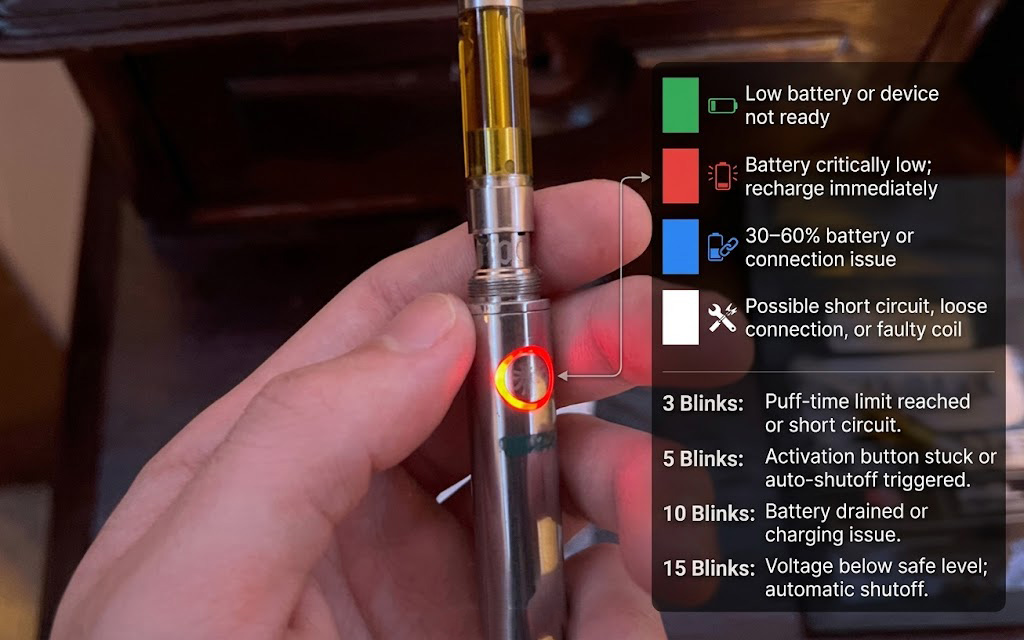
Blinking Lights: Color and Pattern
- Green Blink: Low battery or device not ready.
- Red Blink: Battery critically low; recharge immediately.
- Blue Blink: 30–60% battery or connection issue.
- White Blink: Possible short circuit, loose connection, or faulty coil.
Pattern Indicators:
- Three Blinks: Puff-time limit reached or short circuit.
- Five Blinks: Activation button stuck or auto-shutoff triggered.
- Ten Blinks: Battery drained or charging issue.
- Fifteen Blinks: Voltage below safe level; automatic shutoff.
Common Causes of Blinking
- Dead or Low Battery: Recharge fully using the recommended charger.
- Overheating: Shorten puff duration; allow device to cool.
- Switch Issues: Dirt or debris may jam the activation button.
- Exceeded Puff-Time Limiter: Device temporarily stops for safety.
- Short Circuits: Check for loose connections, damaged coils, or moisture.
- Connection Issues: Ensure tight fit between battery and cartridge.
- Chain Vaping Overload: Avoid continuous use beyond manufacturer guidance.
- Flooded Coil: Replace or dry coils to prevent blinking.
- Burnt Coil: Replace if excessive heat or burnt taste occurs.
- Compatibility Problems: Only use cartridges compatible with your device.
Pro Tip: Always inspect your battery and cartridge connections before use, and replace any worn or damaged components promptly to ensure safe and consistent vaping performance.
Troubleshooting Table: Common Blinking Problems & Solutions
| Issue | Indicator | Quick Fix | US Users Tip |
|---|---|---|---|
| Low Battery | Red/Green Blink | Recharge fully | Avoid non-certified chargers |
| Short Circuit | White Blink / 3 blinks | Clean contacts, check coil | Keep device dry; avoid DIY repairs |
| Stuck Activation | 5 Blinks | Clean button area | Inspect before each use |
| Overheating | Rapid Blink | Reduce puff duration | Allow 30s–1min cooling between uses |
| Flooded Coil | White/Blue Blink | Replace or dry coil | Use correct refill method |
| Incompatible Cartridge | Any unusual blink | Use compatible cartridges | Check user manual for compatibility |
Battery Care Tips
- Clean battery and cartridge contacts regularly.
- Avoid overcharging or undercharging.
- Store in a cool, dry place away from direct sunlight.
- Inspect coils for damage or residue frequently.
- Use only manufacturer-recommended or certified chargers.
FAQ
Q1: Why does my vape battery blink when I charge it?
A1: This may indicate the battery is fully drained or the charging cable/port is faulty.
Q2: Why does my vape pen keep blinking even after charging?
A2: Possible causes include short circuits, poor connections, or internal device faults.
Q3: What does it mean when the battery blinks three times?
A3: Indicates a short circuit or connection issue; clean contacts and check cartridge fit.
Q4: Why is my battery blinking white?
A4: Likely a short circuit, loose connection, or atomizer coil problem.
Q5: How should I charge my vape battery?
A5: Use the manufacturer’s recommended charger; avoid overcharging or low-quality chargers.
Q6: Can a blinking vape battery damage my device?
A6: Persistent issues may reduce battery life or coil function. Address blinking promptly.
Q7: How often should I replace my vape coil to prevent blinking?
A7: Replace whenever you notice burnt taste, flooding, or frequent blinking indicators.
Conclusion
A blinking 510-thread disposable vape battery is usually caused by low charge or poor connection, but can also indicate overheating, coil problems, or incompatible cartridges. Following the troubleshooting steps, regular maintenance, and using compatible components ensures reliable performance and prolongs the life of your vape device.

Written by:
John Doe
John Doe, a seasoned vape enthusiast with a deep passion for exploring the diverse world of vaping. With years of experience under his belt, John has become a connoisseur of both nicotine and cannabis vapes. His journey through various brands and models has given him a rich understanding of the nuances in vaping technology and flavor profiles. John’s insights are shaped by his hands-on experience, making him a reliable guide for anyone navigating the ever-evolving landscape of vaping.
